
Home Screen Widgets
Keep Scripture, feast days and your prayer streak on your Home Screen. iOS also offers Lock Screen widgets with Jesus and Cross symbols.
Bible verses, saint quotes, daily Gospel and the liturgical calendar, close at hand on iOS and Android. English, Spanish and Portuguese.
Trusted by Catholics worldwide
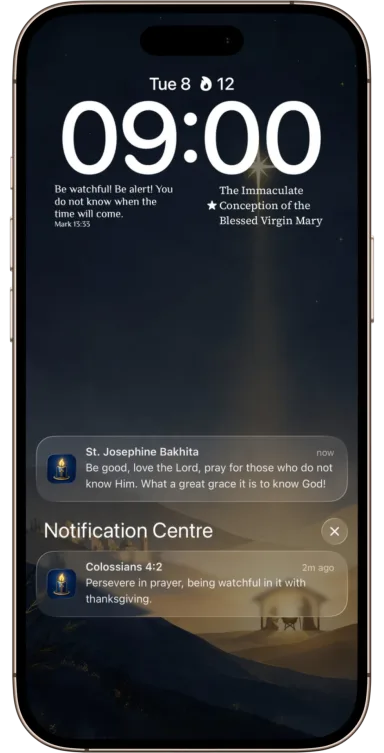
Gospel, saint quotes, liturgical calendar, prayer times, themes and reminders on iOS and Android.
Keep Scripture, feast days and your prayer streak on your Home Screen. iOS also offers Lock Screen widgets with Jesus and Cross symbols.
Readings follow the liturgical calendar all year in English, Spanish, and Portuguese.
1,400+ quotes from saints, Church Fathers, and Scripture, with 26 topics, favorites, streaks, quotes to share, beautiful themes, and custom themes for your widgets.
Set a Sacred Moment for a short prayer. Optional Prayer Focus pauses selected distractions while you pray. On Android, you choose whether to allow Usage Access and Display over other apps.
See local feasts and solemnities with the calendar selected for your app language and device region, plus the daily Gospel at a glance.
Full support for English, Spanish, and Portuguese.
Add the widget in three simple steps
Get Catholic Daily from the App Store or Google Play and open it once.
On iOS, touch and hold the Home Screen, then choose Edit and Add Widget. On Android, touch and hold an empty area, choose Widgets and find Catholic Daily.
Receive Gospel readings and saint quotes every day automatically.
Hear from our community
“I love having the Gospel on my home screen. It's a beautiful way to start each day.”
- Maria Rodriguez
“The saint quotes and themes are inspiring. Catholic Daily has become part of my morning routine.”
- James Thompson
“The liturgical calendar widget is so helpful. I always know what feast day it is.”
- Sofia Martinez
“Simple, beautiful, and meaningful. Exactly what I needed for daily reflection.”
- Michael Peterson
“Having the readings in Spanish for my family has been a blessing. Gracias!”
- Ana Costa
“Beautiful design and meaningful content. My family looks forward to the daily Gospel each morning.”
- David Wilson
Common questions about Catholic Daily
Catholic Daily supports iOS 17+ and Android 9+. Install it from the App Store or Google Play and open it once. On iOS, touch and hold the Home Screen, then choose Edit and Add Widget. On Android, touch and hold an empty area of your Home Screen, choose Widgets, find Catholic Daily and add a widget.
On iOS, open Catholic Daily, go to Settings, choose Jesus Symbol or Cross Symbol, then add the corresponding Lock Screen widget. These Lock Screen symbol widgets are an iOS feature. Android offers Home Screen widgets and quote wallpapers instead.
The app supports English, Spanish, and Portuguese. You can change the language in Settings.
Catholic Daily has free and Patron features on iOS and Android. Patron unlocks the full quote and topic library, premium themes, custom themes and additional reminder times. One Sacred Moment time and optional Prayer Focus are free. See the App Store or Google Play for current pricing and the features included on your platform.
Content follows the liturgical calendar. In the app you can set how often widgets refresh (for example once or twice a day, every 6 hours, or every 2 hours) and browse previous readings anytime.
Both platforms offer Home Screen widgets, themes, favorites and shareable quotes; Patron adds custom themes. iOS also has Lock Screen widgets with Jesus and Cross symbols and interactive medium and large widgets. Android offers Daily Quote, Liturgical Calendar and Prayer Streak Home Screen widgets, plus quote wallpapers.
Bundled Gospel readings, Bible verses and saint quotes are available offline on iOS and Android. Downloading online themes, content updates and managing store purchases requires an internet connection.
Sacred Moments are scheduled pauses for a short prayer. One time is free; Patron adds more. iOS supports up to 10 times on iOS 26+ and up to 5 on earlier iOS; Android supports up to 10. Optional Prayer Focus pauses selected distractions. Android asks for Usage Access and Display over other apps; alarm and notification permissions may also be needed. App selections and activity used by Prayer Focus stay on your device.
Join the Catholic Daily community for daily Gospel, saint quotes, and liturgical inspiration.